
Themeable Xano?
Xano ships with a set of well defined UI for both light and dark mode. It is intuitive and has a well-defined hierarchy. Each color has its own meaning and place.
And I've spent an awful lot of time inside Xano and growingly more time in text editors. The text editors usually allow very much flexibility when it comes to themes and there is always a growing community of lovely folks that create well-crafted themes.
Now this is clearly not as straightforward with a web app, like Xano.
But it is not impossible!
Seeing this screenshot honestly, it did make a refreshment in the use of Xano. With this fresh look, I just really make it difficult for myself to switch to IDEs...
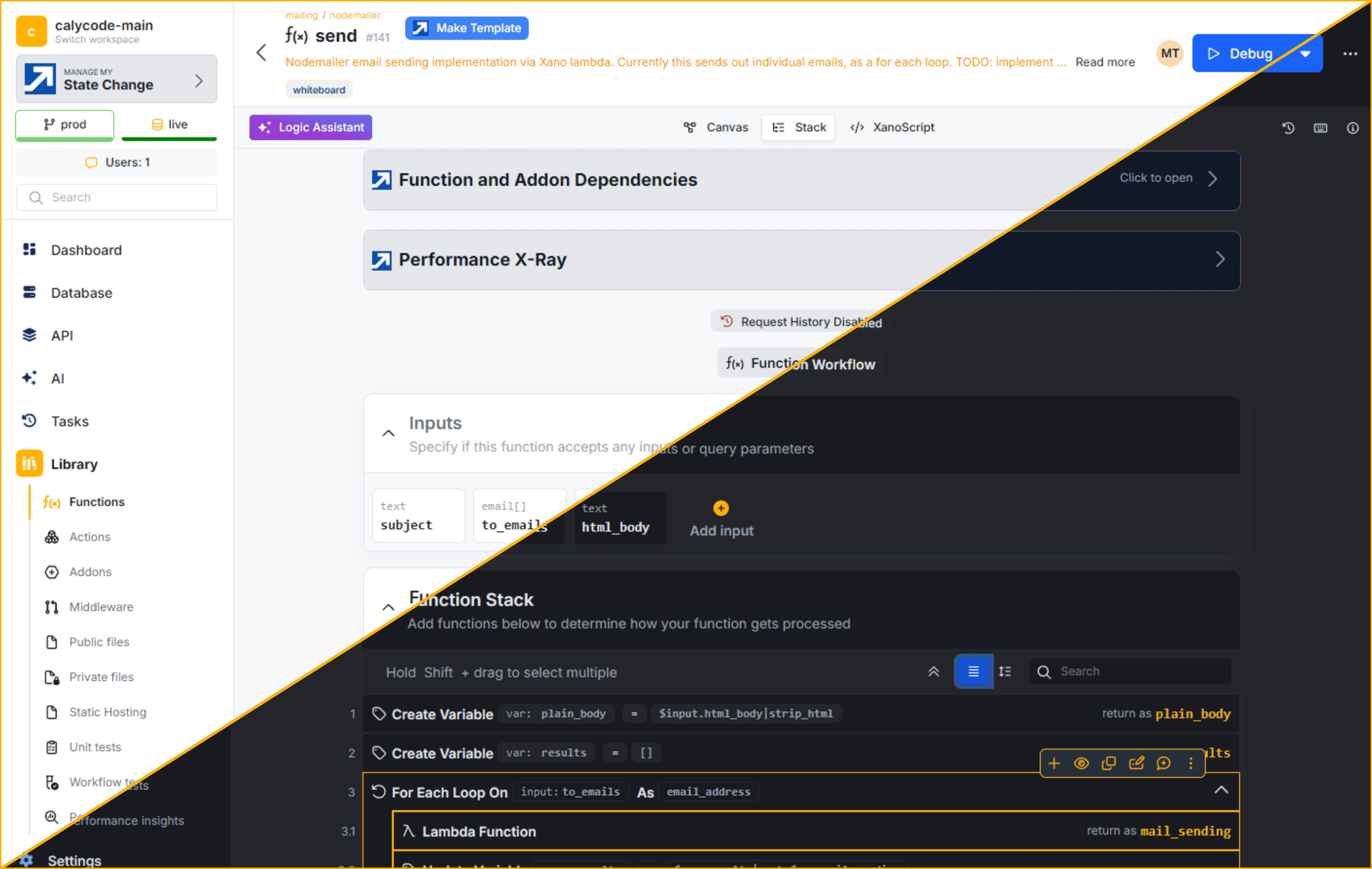
Here's a cool browser extension that enables this: Stylus
How to actually do this?
And here's a CSS file I use to bring some Cloudflare-y vibes into Xano for a fresh look.
/* ==UserStyle==
@name           Xano Cloudflare Inspired
@namespace      github.com/openstyles/stylus
@version        1.0.1
@description    Modern Cloudflare-inspired theme for Xano dashboards
@author         Mihály @calycode
==/UserStyle== */
@-moz-document domain("your-instance.xano.io") {

    :root,
    [data-bs-theme=light] {
        /* Core palette */
        --bs-white: #fff;
        --bs-black: #121317;
        --bs-gray-100: #f6f8fa;
        --bs-gray-200: #e5e7eb;
        --bs-gray-300: #d1d5db;
        --bs-gray-400: #9ca3af;
        --bs-gray-500: #6b7280;
        --bs-gray-600: #4b5563;
        --bs-gray-700: #374151;
        --bs-gray-800: #25272b;
        --bs-gray-900: #181a1f;
        --bs-gray: #6b7280;
        --bs-gray-dark: #25272b;

        /* Cloudflare accent colors */
        --bs-primary: #ffb300;
        /* Cloudflare Blue */
        --bs-primary-alt: #ffe066;
        /* Deeper Blue */
        --bs-primary-light: #e6f1fc;
        --bs-secondary: #007cf0;
        /* Cloudflare Orange */
        --bs-success: #23b898;
        --bs-info: #17a2b8;
        --bs-warning: #ffe066;
        --bs-danger: #d7263d;
        --bs-pink: #ff4ecd;
        --bs-purple: #6f42c1;
        --bs-indigo: #6610f2;
        --bs-teal: #20c997;
        --bs-orange: #ff9100;
        --bs-yellow: #ffe066;
        --bs-cyan: #0dcaf0;

        /* RGBs for overlays/shadows */
        --bs-primary-rgb: 0, 124, 240;
        --bs-primary-alt-rgb: 0, 89, 178;
        --bs-secondary-rgb: 255, 145, 0;
        --bs-success-rgb: 35, 184, 152;
        --bs-info-rgb: 23, 162, 184;
        --bs-warning-rgb: 255, 224, 102;
        --bs-danger-rgb: 215, 38, 61;
        --bs-light-rgb: #6b7280;
        --bs-dark-rgb: 24, 26, 31;
        --bs-white-rgb: 255, 255, 255;
        --bs-black-rgb: 18, 19, 23;

        /* Text & background */
        --bs-body-bg: #fff;
        --bs-body-bg-rgb: 255, 255, 255;
        --bs-body-color: #181a1f;
        --bs-body-color-rgb: 24, 26, 31;
        --bs-emphasis-color: #181a1f;
        --bs-emphasis-color-rgb: 24, 26, 31;
        --bs-secondary-color: #6b7280;
        --bs-secondary-color-rgb: 107, 114, 128;
        --bs-secondary-bg: #f6f8fa;
        --bs-secondary-bg-rgb: 246, 248, 250;
        --bs-tertiary-color: #9ca3af;
        --bs-tertiary-color-rgb: 156, 163, 175;
        --bs-tertiary-bg: #f6f8fa;
        --bs-tertiary-bg-rgb: 229, 231, 235;
        --bs-heading-color: #181a1f;
        --bs-link-color: #ffb300;
        --bs-link-hover-color: #0059b2;
        --bs-link-color-rgb: 0, 124, 240;
        --bs-link-hover-color-rgb: 0, 89, 178;
        --bs-code-color: #ff9100;
        --bs-highlight-color: #181a1f;
        --bs-highlight-bg: #ffe066;

        /* Card/Component backgrounds */
        --bs-card-bg: #fff;
        --bs-navbar-bg: #f6f8fa;
        --bs-border-color: #e5e7eb;
        --bs-border-color-translucent: rgba(24, 26, 31, 0.08);

        /* Subtle backgrounds */
        --bs-primary-bg-subtle: #e6f1fc;
        --bs-primary-alt-bg-subtle: #e0eafd;
        --bs-secondary-bg-subtle: #fff3e0;
        --bs-success-bg-subtle: #e6fcf7;
        --bs-info-bg-subtle: #e3f6fa;
        --bs-warning-bg-subtle: #fffbe6;
        --bs-danger-bg-subtle: #fde9ec;
        --bs-light-bg-subtle: #f6f8fa;
        --bs-dark-bg-subtle: #e5e7eb;

        /* Subtle borders */
        --bs-primary-border-subtle: #fff2b3;
        --bs-primary-alt-border-subtle: #e5e7eb;
        --bs-secondary-border-subtle: #ffe5b3;
        --bs-success-border-subtle: #b3f6e6;
        --bs-info-border-subtle: #b3e6f6;
        --bs-warning-border-subtle: #fff2b3;
        --bs-danger-border-subtle: #f6b3c2;
        --bs-light-border-subtle: #e5e7eb;
        --bs-dark-border-subtle: #9ca3af;

        /* Buttons, focus, etc. */
        --bs-focus-ring-color: rgba(0, 124, 240, 0.25);
        --bs-form-valid-color: #23b898;
        --bs-form-valid-border-color: #23b898;
        --bs-form-invalid-color: #d7263d;
        --bs-form-invalid-border-color: #d7263d;
        --bs-border-width: 1px;
        --bs-border-style: solid;
        --bs-border-radius: .375rem;
        --bs-border-radius-sm: .25rem;
        --bs-border-radius-lg: .625rem;
        --bs-border-radius-xl: 1rem;
        --bs-border-radius-xxl: 2rem;
        --bs-border-radius-2xl: var(--bs-border-radius-xxl);
        --bs-border-radius-pill: 50rem;
        --bs-box-shadow: 0 .5rem 1rem rgba(18, 19, 23, .03);
        --bs-box-shadow-sm: 0 .125rem .25rem rgba(18, 19, 23, .05);
        --bs-box-shadow-lg: 0 1rem 3rem rgba(18, 19, 23, .13);
        --bs-box-shadow-inset: inset 0 1px 2px rgba(18, 19, 23, .075);
        --bs-gradient: linear-gradient(180deg, rgba(255, 255, 255, .12), rgba(255, 255, 255, 0));
        --bs-font-sans-serif: "Inter", system-ui, -apple-system, "Segoe UI", Roboto, "Helvetica Neue", Arial, sans-serif;
        --bs-body-font-family: var(--bs-font-sans-serif);
        --bs-body-font-size: .875rem;
        --bs-body-font-weight: 400;
        --bs-body-line-height: 1.5;
    }

    [data-bs-theme=dark] {
        color-scheme: dark;
        /* Core palette */
        --bs-white: #181a1f;
        --bs-black: #fff;
        --bs-gray-100: #1a1c21;
        --bs-gray-200: #23252b;
        --bs-gray-300: #25272b;
        --bs-gray-400: #374151;
        --bs-gray-500: #6b7280;
        --bs-gray-600: #9ca3af;
        --bs-gray-700: #d1d5db;
        --bs-gray-800: #e5e7eb;
        --bs-gray-900: #f6f8fa;
        --bs-gray: #9ca3af;
        --bs-gray-dark: #23252b;

        /* Cloudflare accent colors (tweaked for dark) */
        --bs-primary: #ffb300;
        --bs-primary-alt: #ffe066;
        --bs-primary-light: #232e3b;
        --bs-secondary: #007cf0;
        /* Brighter orange for dark bg */
        --bs-success: #23b898;
        --bs-info: #17a2b8;
        --bs-warning: #ffe066;
        --bs-danger: #ff4b6b;
        --bs-pink: #ff4ecd;
        --bs-purple: #a890fa;
        --bs-indigo: #a3bffa;
        --bs-teal: #20c997;
        --bs-orange: #ffb300;
        --bs-yellow: #ffe066;
        --bs-cyan: #0dcaf0;

        /* RGBs for overlays/shadows */
        --bs-primary-rgb: 18, 148, 245;
        --bs-primary-alt-rgb: 0, 124, 240;
        --bs-secondary-rgb: 255, 179, 0;
        --bs-success-rgb: 35, 184, 152;
        --bs-info-rgb: 23, 162, 184;
        --bs-warning-rgb: 255, 224, 102;
        --bs-danger-rgb: 255, 75, 107;
        --bs-light-rgb: 26, 28, 33;
        --bs-dark-rgb: 230, 232, 235;
        --bs-white-rgb: 24, 26, 31;
        --bs-black-rgb: 255, 255, 255;

        /* Text & background */
        --bs-body-bg: #181a1f;
        --bs-body-bg-rgb: 24, 26, 31;
        --bs-body-color: #e5e7eb;
        --bs-body-color-rgb: 229, 231, 235;
        --bs-emphasis-color: #fff;
        --bs-emphasis-color-rgb: 255, 255, 255;
        --bs-secondary-color: #9ca3af;
        --bs-secondary-color-rgb: 156, 163, 175;
        --bs-secondary-bg: #23252b;
        --bs-secondary-bg-rgb: 35, 37, 43;
        --bs-tertiary-color: #9ca3af;
        --bs-tertiary-color-rgb: 107, 114, 128;
        --bs-tertiary-bg: #23252b;
        --bs-tertiary-bg-rgb: 37, 39, 43;
        --bs-heading-color: #fff;
        --bs-link-color: #ffb300;
        --bs-link-hover-color: #21c4ff;
        --bs-link-color-rgb: 18, 148, 245;
        --bs-link-hover-color-rgb: 33, 196, 255;
        --bs-code-color: #ffb300;
        --bs-highlight-color: #fff;
        --bs-highlight-bg: #232e3b;

        /* Card/Component backgrounds */
        --bs-card-bg: #23252b;
        --bs-navbar-bg: #1a1c21;
        --bs-border-color: #25272b;
        --bs-border-color-translucent: rgba(255, 255, 255, 0.08);

        /* Subtle backgrounds */
        --bs-primary-bg-subtle: #232e3b;
        --bs-primary-alt-bg-subtle: #1a2431;
        --bs-secondary-bg-subtle: #2d2211;
        --bs-success-bg-subtle: #18332e;
        --bs-info-bg-subtle: #182b32;
        --bs-warning-bg-subtle: #332f19;
        --bs-danger-bg-subtle: #33181e;
        --bs-light-bg-subtle: #1a1c21;
        --bs-dark-bg-subtle: #23252b;

        /* Subtle borders */
        --bs-primary-border-subtle: #3e7cb1;
        --bs-primary-alt-border-subtle: #2367a5;
        --bs-secondary-border-subtle: #ffb300;
        --bs-success-border-subtle: #23b898;
        --bs-info-border-subtle: #17a2b8;
        --bs-warning-border-subtle: #6b7280;
        --bs-danger-border-subtle: #ff4b6b;
        --bs-light-border-subtle: #23252b;
        --bs-dark-border-subtle: #6b7280;

        /* Buttons, focus, etc. */
        --bs-focus-ring-color: rgba(18, 148, 245, 0.25);
        --bs-form-valid-color: #23b898;
        --bs-form-valid-border-color: #23b898;
        --bs-form-invalid-color: #ff4b6b;
        --bs-form-invalid-border-color: #ff4b6b;
        --bs-border-width: 1px;
        --bs-border-style: solid;
        --bs-border-radius: .375rem;
        --bs-border-radius-sm: .25rem;
        --bs-border-radius-lg: .625rem;
        --bs-border-radius-xl: 1rem;
        --bs-border-radius-xxl: 2rem;
        --bs-border-radius-2xl: var(--bs-border-radius-xxl);
        --bs-border-radius-pill: 50rem;
        --bs-box-shadow: 0 .5rem 1rem rgba(255, 255, 255, .03);
        --bs-box-shadow-sm: 0 .125rem .25rem rgba(255, 255, 255, .05);
        --bs-box-shadow-lg: 0 1rem 3rem rgba(255, 255, 255, .13);
        --bs-box-shadow-inset: inset 0 1px 2px rgba(255, 255, 255, .075);
        --bs-gradient: linear-gradient(180deg, rgba(0, 0, 0, .08), rgba(0, 0, 0, 0));
        --bs-font-sans-serif: "Inter", system-ui, -apple-system, "Segoe UI", Roboto, "Helvetica Neue", Arial, sans-serif;
        --bs-body-font-family: var(--bs-font-sans-serif);
        --bs-body-font-size: .875rem;
        --bs-body-font-weight: 400;
        --bs-body-line-height: 1.5;
    }

    /* Protect the logo from global color overrides */
    app-xano-logo,
    app-xano-logo *,
    app-xano-logo svg,
    app-xano-logo svg * {
        fill: var(--bs-secondary) !important;
        stroke: var(--bs-secondary) !important;
        color: var(--bs-secondary) !important;
    }
}
@calycode, we build open, reliable, and automated workflows for Xano that empower teams with clarity, transparency, and control. Our mission: make backend development safe, collaborative, and future-ready, so every team can ship confidently and trust the process.
We have a Chrome Browser Extension for Xano to get you rolling much faster and more reliable Xano systems. If you're curious how @calycode/cli works with Xano features, check out our repo, docs or drop us a message on Discord!
You can also get started with Xano right now, here.