
Xano API Group Swagger Recharged
LLMs can work with OpenAPI (OAS) specifications when building a frontend that relies on a Xano backend. Xano exposes this via Metadata API and also via the Xano UI in your browser.
Some time ago I've stumbled across the Scalar API client and their API Reference component that just felt so much more natural for API documentation purposes. See their Github Repo for examples and usage. Here's an example of a minimal API group
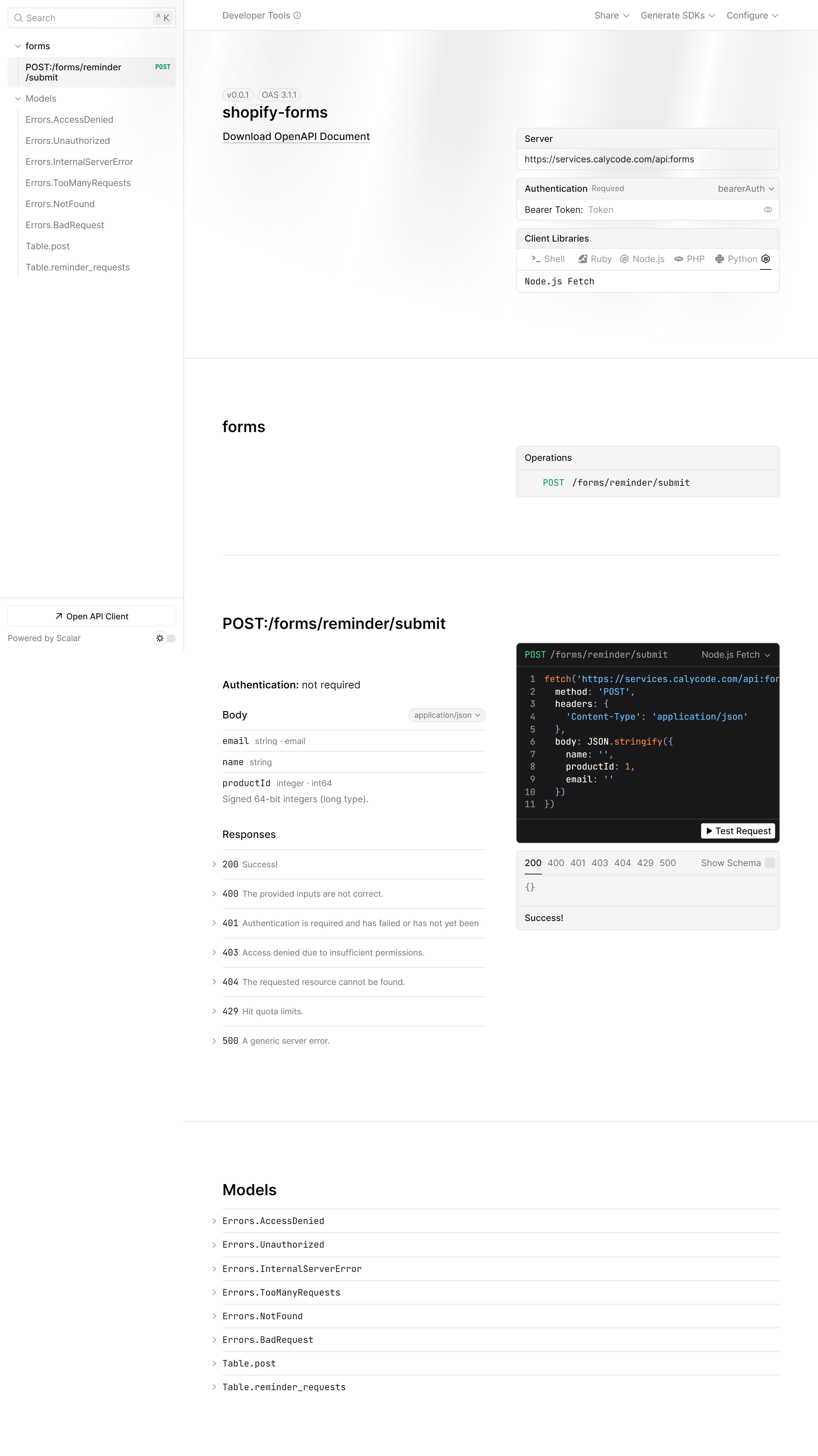
Since Scalar feels more natural and modern, I've found myself sending documentation whenever I had to do so, to frontend devs via Scalar and not the built in Swagger of Xano. I had a couple of reasons:
- Scalar gives a modern UI
- I could either serve it from the client's Xano instance, or Cloudflare or set up a Github Repo to share the documentation with the client's frontend devs.
- Since I got the control over the OAS, I've been adding the table schemas as well to it, so frontend devs have more clarity.
- Scalar API reference includes a lightweight API client, which enables Postman-like API testing capabilities, right in your API Reference with full request control, headers, body and code snippets.
This process of generating and sharing the revamped documentation became sligthly repetitve, that's why I've built this flow into the @calycode/cli and it is as smooth as the command flow below to generate a modern, easy to use Open API specification generated for your Xano API groups:
# Set up your instance - so that your terminal knows about the instance:
caly-xano init --name demo-instance --url https://your-instance.xano.io --token METADATA_API_TOKEN

# Next up actually run the oas generation:
caly-xano generate spec --instance demo-instance --workspace main-workspace --branch v1 --group your_api_group_name --print-output-dir
T  Generating OpenAPI specifications...
|
o  1 / 1 (100%) - Processing group: your_api_group_name
|
—  OpenAPI specs generated successfully!

OUTPUT_DIR=OUTPUT_OF_THE_OAS
Important note, is that while this seems like a long command, it's actually also available as interactive selection for the context. The above shown example is primarily the usecase for this OAS generation in a CI/CD pipeline-like approach where all options must be provided to the CLI. Last, but not least, you'd also like to probably see the generated documentation in your browser. If you wish to do so, then the xano serve-oas command is the way to go.
@calycode, we build open, reliable, and automated workflows for Xano that empower teams with clarity, transparency, and control. Our mission: make backend development safe, collaborative, and future-ready, so every team can ship confidently and trust the process.
We have a Chrome Browser Extension for Xano to get you rolling much faster and more reliable Xano systems. If you're curious how @calycode/cli works with Xano features, check out our repo, docs or drop us a message on Discord!
You can also get started with Xano right now, here.